Can Employers Tell If You Used AI? Spotting AI-Generated Text in Job Applications (2026)
Can recruiters detect an AI-written cover letter? What employers actually check in 2026, why AI detectors get it wrong, and why sounding like yourself matters more than hidden characters.
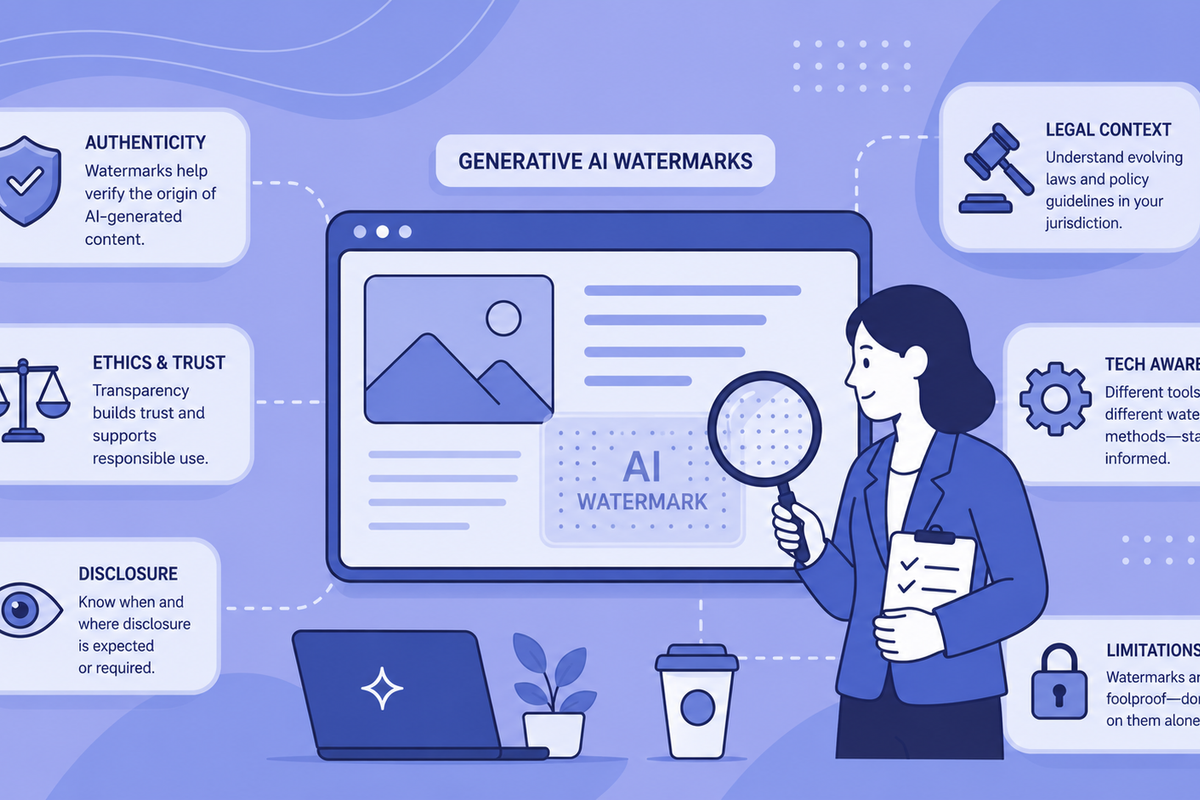
The short answer: Recruiters cannot prove you used AI, but they can spot the signals — generic phrasing, keyword mirroring, and sentences that all run the same length. What gets noticed is writing that sounds impersonal and generic, not hidden characters. AI detectors add a second layer, scoring text on statistical predictability, but they produce false positives often enough that no careful hiring team should reject a candidate on a tool score alone. There is also a quieter, formatting-level detail most guides miss: invisible Unicode characters (zero-width spaces and joiners) that can ride along in AI-assisted output. A recruiter will never see them, and removing them keeps your document clean and glitch-free — but it does nothing to change a detection result. This guide covers all three — what gets flagged, why detectors are unreliable, and how to make your writing genuinely sound like you.
Spotting AI-generated text in job applications is messier than most hiring guides admit. If you are an applicant, the question is blunt: will my cover letter get flagged? If you are a recruiter, the question is whether any of the signals you can see hold up well enough to act on. Both sides are working with the same weak evidence, and being honest about that is the whole point of this article.
Can Employers Tell If You Used AI on a Job Application?
Employers can identify probable AI use. They cannot confirm it. That gap matters, because most hiring decisions are made as if the gap does not exist.
Surveys through 2026 show how widely this is happening on the recruiter side. A large share of hiring managers — reported in multiple industry surveys at well over 80% — say they believe they can tell when an application was written with AI. A growing minority of employers, somewhere around 40% of larger companies in recent reporting, now run applications through automated detection tools. And many recruiters say they form a judgement in seconds, before any tool is involved.
Two things are true at once here. Recruiters are actively looking for AI signals, and they often think they have found them. But "I think I can tell" is not the same as "I can prove it," and the tools meant to close that gap are weaker than their marketing suggests. OpenAI withdrew its own AI text classifier in 2023 because the accuracy was too low to be useful. Independent research published since has repeatedly found that commercial detectors struggle with mixed human-and-AI text and swing wildly depending on length and writing style.
So the realistic answer to "can employers tell?" is: they can guess, sometimes confidently, sometimes wrongly. For a deeper treatment of the recruiter side specifically, see can recruiters tell if you used ChatGPT.
What Recruiters Actually Check First
Recruiters who read hundreds of applications flag the same patterns, and none of them require a tool. These are the signals a human reader notices.
- Generic accomplishment language — phrases like "drove significant results," "collaborated cross-functionally," or "delivered impactful outcomes" that describe achievement with no numbers, names, or context.
- Perfect keyword mirroring — cover letters that echo the exact wording of the job description, reading like a checklist response rather than a genuine account of experience.
- Uniform sentence length and rhythm — human writing varies. AI output tends toward paragraphs where every sentence runs roughly the same length and follows the same grammatical shape.
- Third-person self-description — a candidate writing "this individual brings extensive experience" in their own cover letter is an obvious tell.
- Absence of specifics — no manager named, no project, no team size, no detail only someone who actually did the work would know.
Here is the problem with every item on that list: they also describe weak human writing. A nervous junior applicant writing badly in their own words can hit all five. Pattern spotting cannot separate "wrote it with AI" from "wrote it poorly," and that is exactly where false accusations come from. One widely shared example is the word "delve," which a prominent tech founder once treated as a tell that ChatGPT had touched an email — even though plenty of humans use the word naturally. We keep a fuller list of common AI words that get text flagged for anyone editing their own drafts.
How AI Detectors Score a Cover Letter
The detectors a recruiter might paste your cover letter into mostly run on two measurements: perplexity and burstiness.
Perplexity measures how predictable the word choices are. Language models tend to pick high-probability tokens — the words most likely to follow what came before. Human writers make more surprising choices. Low perplexity reads as statistically "safe" in the way AI output tends to be.
Burstiness measures variation in sentence length and complexity. Human writing is bursty: a short punchy sentence followed by a long analytical one. AI output flattens that variation into a more uniform texture.
Both are probabilistic. They tell you where text sits on a statistical distribution, not whether a specific person or model produced it. For the mechanics in detail, our explainer on how AI detection tools work goes under the hood.
The False Positive Problem No One Puts on the Job Ad
AI detectors flag human-written text as AI at a rate that makes them genuinely unreliable for any decision with consequences. Two groups get hit hardest.
Non-native English speakers are flagged disproportionately. Clear, careful, grammatically correct English that avoids idiomatic flourishes scores as "AI-like," because it resembles the high-probability output of a model. A candidate who learned English formally and writes it cleanly is statistically punished for doing exactly what they were taught.
Short text is the second trap. Cover letters are short. Most detectors are calibrated on longer documents, and their confidence collapses on samples under a few hundred words — a 150-word paragraph can return a high AI score purely from insufficient data. Our breakdown of why short texts break detection covers the math, and the broader reasons AI detectors fail explains the failure modes.
If a hiring team filters candidates on detector scores, it is almost certainly rejecting some real humans on false results. That should weigh on any recruiter before a score becomes a rejection.
Invisible Characters: A Formatting Detail No Recruiter Can See
There is a third detail that sits entirely below human reading: invisible Unicode characters that can end up in the text itself. To be clear up front — this is a formatting and privacy matter, not a reliable way to tell whether AI wrote something.
Text that has passed through ChatGPT, Claude, or Gemini can carry zero-width spaces (U+200B), zero-width joiners (U+200D), and other ASCII control characters — often picked up from copy-and-paste or encoding quirks. They are invisible in any standard editor or word processor. They do not change how the text looks or reads. Any system that inspects the raw character stream can spot them, but spotting them tells you nothing definitive about authorship.
For job applications this matters in a specific way: an applicant who copies AI-assisted text into a form, a cover letter document, or an ATS field can carry these characters without knowing. Our guide to ATS systems and AI watermarks covers how that plays out when an Applicant Tracking System parses your file.
Where These Invisible Characters Come From
Invisible characters can end up in AI-assisted text for mundane reasons — copy-and-paste from chat interfaces, formatting artefacts, and encoding quirks all introduce them, often without the user noticing. You may also see claims that models deliberately embed hidden "watermarks" to identify their output; treat those claims with caution, because there is no reliable, published mechanism that lets a stray zero-width character prove which model wrote a passage. Whatever the source, these characters are a formatting and privacy detail, not a reliable fingerprint.
When that text is pasted into a document, the invisible characters travel with it. A recruiter reading the letter in Microsoft Word sees nothing unusual. A script scanning the raw .docx XML finds the characters immediately.
What Invisible Characters Look Like in Raw Form
A paragraph that reads cleanly to a human —
"I am writing to express my interest in the Senior Product Manager role at your organisation. My five years of experience in B2B SaaS..."
— might contain, in its raw character stream, sequences like:
I am writing to express...
Those zero-width spaces and joiners are completely invisible in rendered text but present in the underlying data. An ATS parsing the document for keyword matching can misread tokens that these characters split, causing the application to score incorrectly on skills it actually contains.
Will Your Application Get Flagged? A Practical Self-Check
If you used AI to help draft an application, run through this before you submit. Most "flags" are avoidable.
- Does it contain specifics only you could know? Real numbers, named projects, a team size, a manager, a measurable result. Specificity is the single strongest defence, because it is the one thing AI cannot fabricate convincingly.
- Can you defend every claim in an interview? If a line in your cover letter would collapse under one follow-up question, it reads as filler whether or not AI wrote it.
- Does the rhythm vary? Read it aloud. If every sentence lands at the same length, break some up.
- Does it sound like you? This is what recruiters actually react to. Generic, impersonal writing is what gets noticed — not hidden characters.
- Did you clean the invisible characters? Optional housekeeping: it keeps your document clean and glitch-free, but it does not change a detection result.
How to Check Your Text Before You Submit
The technical step is to run any AI-assisted text through a Unicode inspection tool before it goes into an application. GPT Watermark Remover detects 40+ types of invisible Unicode character and removes them client-side — the text never leaves your browser. The detection tool is free for standard text volumes, and for whole files the document scanner handles .docx and .pages directly.
Mainstream AI detectors such as Turnitin analyse your visible writing, measuring statistical patterns in word choice and sentence rhythm. Cleaning characters fixes formatting and privacy; changing a detection result would mean changing the writing.
This is not about changing a detection score — it cannot do that. It is data hygiene, the same category of action as stripping a trailing space from a spreadsheet cell: it keeps your document clean and glitch-free. What actually moves the needle with a recruiter is sounding like yourself, so editing for accuracy and voice is the job that matters; our notes on making AI text read like your own cover that side.
Visible vs Invisible AI Signals
| Signal type | Visible to a human reader? | Detectable by tool? | Reliability |
|---|---|---|---|
| Generic phrasing | Yes | Partially (perplexity) | Low — high false positive rate |
| Uniform sentence rhythm | With effort | Yes (burstiness) | Low–moderate — affected by writing style |
| Perfect keyword mirroring | Yes | No | Moderate — also found in poor human writing |
| Zero-width spaces / joiners | No | Yes (character inspection) | Low as an AI signal — they come from copy-paste and encoding quirks too, so presence proves nothing about authorship |
| ASCII control characters | No | Yes (character inspection) | Low as an AI signal — a formatting artefact, not proof of how the text was written |
The table makes the core tension obvious: none of these signals proves AI authorship on its own. The visible ones overlap with plain weak human writing, and the invisible characters are a formatting detail that copy-paste and encoding can introduce just as easily as any model — which is why the only thing that genuinely lands with a recruiter is writing that sounds like a real person.
What Good AI Use in a Job Application Looks Like
Using AI to help draft application materials is not the problem. Using the output uncritically is. The failure mode is submitting raw AI text — no personalisation, no accuracy check, none of your own voice or specifics.
Productive use looks like this: a model produces a structural draft, then you rewrite it with real examples, real numbers, and claims you can stand behind in an interview. The AI handles the scaffolding; you supply the substance. A candidate who works this way and submits clean, technically sound text is doing nothing different from someone who uses spell-check or a grammar tool. The candidate who submits unedited AI output with invented credentials is doing something else entirely — and the problem there is the fabrication, not the AI.
This is also why our own tool exists. The founder built GPT Watermark Remover after watching invisible characters in AI output trip up ATS parsing and detection scripts for ordinary, honest users. More than 8,500 writers now use it, and over 50,000 cleanings have been processed — the great majority of them clean, legitimate text that simply carried character debris from the generation step.
Is It Fair to Use AI in Job Applications?
Most guides treat this as the headline question. It is actually less interesting than the technical questions underneath it, because fairness depends entirely on what the AI did.
Using AI to check grammar and tighten phrasing is close to using a professional CV editor — something candidates have paid for, openly, for decades. Using AI to fabricate qualifications or experience is fraud, regardless of the tool. The honest middle ground, where most real usage sits, is genuinely ambiguous: AI assistance on applications is now widespread, inconsistently disclosed, and variably problematic depending on how it is used. Any guidance that pretends otherwise is oversimplifying.
When AI Detection Should Not Be Used to Reject a Candidate
For recruiters, a detector score is one weak data point, not a verdict. Acting on it without weighing the following is operating on incomplete information:
- Whether the applicant is a non-native English speaker (high false positive rate).
- Whether the text is short — under 300 words, accuracy drops on every major tool.
- Whether the role description itself was AI-written and the applicant is mirroring it back.
- Whether the detector was validated on this kind of text; academic prose and professional application writing are different distributions.
A more defensible process leans on what tools cannot fake: human review for specificity, and interview follow-up that asks candidates to expand on claims in their letter. Genuine experience is verifiable under questioning. Fabricated filler is not. The wider tool field is covered in our 2026 AI content detection guide.
Summary: What Actually Works for Spotting AI Text
No single method reliably identifies AI-generated text in a job application. The most defensible approach stacks several weak signals instead of trusting any one.
- Human review for specificity — does the application contain details only this person could know?
- Interview follow-up — ask candidates to expand on cover-letter claims; real experience holds up, filler does not.
- Statistical detectors — useful as one data point, never as the decision on their own.
Character inspection sits outside that list on purpose. Invisible Unicode characters are a formatting and privacy detail, not a dependable AI signal — copy-paste and encoding introduce them too, so their presence proves nothing about who wrote the text. Cleaning them keeps a document tidy; it is not a method for spotting AI.
The false-positive problem means acting on a detector score without supporting evidence risks excluding qualified people. The invisible-character angle means a technically clean submission is not proof of human authorship either — it may just mean the applicant ran a cleanup tool. Neither direction resolves cleanly, and any guide that tells you it does is selling certainty that does not exist.
Frequently Asked Questions
Can employers tell if you used AI for a cover letter?
Employers can identify probable AI use from writing patterns — generic phrasing, uniform sentence structure, and keyword mirroring — and many say they spot it within seconds. They cannot confirm it. Detection tools add a layer but produce false positives often enough that no careful hiring team should reject a candidate on a tool score alone. In practice, what recruiters react to is generic, impersonal writing — not hidden characters. Invisible Unicode characters can ride along in AI-assisted text, but they are a formatting detail, not a reliable signal of authorship, and removing them does not change a detection result.
Will my resume get flagged as AI if I used ChatGPT to help write it?
It can be, especially if you submit the output unedited. What gets noticed is generic phrasing and sentences that all run the same length — writing that does not sound like you. Editing for specificity and voice is what addresses that, and it is what actually matters. Separately, AI-assisted text can carry invisible Unicode characters; running it through a client-side cleaner tidies the formatting and protects privacy, but it does not change an AI-detection result — only changing the writing would. Using AI as a drafting aid and then rewriting in your own words is low risk; submitting raw AI text is high risk.
Do AI detection tools work on short cover letter text?
Short texts — under 300 words — are unreliable inputs for AI detection. Most tools are calibrated on longer documents, and their confidence intervals widen sharply on shorter samples. A 150-word cover letter paragraph can return a high AI score purely from insufficient data rather than actual AI authorship.
What are invisible Unicode characters and how do they end up in job applications?
They are zero-width spaces, zero-width joiners, and ASCII control characters that can appear in AI-assisted text — typically introduced by copy-and-paste from chat interfaces or by encoding quirks rather than by any proven deliberate "watermark." They are invisible in any standard editor. When a candidate copies AI output into a cover letter or application form, these characters can travel with the text and show up to systems that inspect the raw character stream. That is a formatting and privacy detail; it is not a reliable indicator of who or what wrote the passage.
Does removing invisible characters from AI text count as deception?
No. Removing zero-width spaces and other invisible Unicode characters is a data-hygiene task, equivalent to removing extra whitespace or correcting an encoding error. The substance of the text is unchanged. Deception in applications comes from false claims about experience and qualifications — a content problem, not a character-encoding one.
Why do AI detectors flag non-native English speakers as AI?
Detectors score text on how closely it matches the statistical patterns of AI output — high token predictability and low sentence variation. Clear, grammatically correct English that avoids idiomatic variation scores similarly to AI output on these metrics. Non-native speakers who write formally and carefully are disproportionately affected by this failure mode, which is one of the strongest arguments against using detector scores to reject candidates.
Ready to Remove AI Watermarks?
Try our free AI watermark removal tool. Detect and clean invisible characters from your text and documents in seconds.
Try GPT Watermark RemoverRecommended Articles
How to Check If a Text Has a ChatGPT Watermark (Complete Guide 2025)
Learn 7 proven methods to check if text has ChatGPT watermarks. From instant online tools to advanced detection techniques—identify invisible AI markers in any content.
How to Use AI for Your Resume the Right Way (2026)
Learn the smart workflow for using AI to write resumes in 2026. Clean up invisible characters, optimize for ATS systems, and make your application authentically yours.
Learn More About Us
Discover our mission to help users maintain privacy and control over AI-generated content. Learn about our technology and commitment to transparency.